
Kling 4.0 for the brand film. SeeDance 2.5 for the TikTok ad.
Kling 4.0 is new, and it now gets the shots in our brand films that need the most control. It kept one man's face through a six-shot film, and it ended a camera move on a frame we had already approved. SeeDance 2.5 still makes our TikTok-style ads, where one render has to deliver the shots, the spoken lines and the sound.
Kuaishou released Kling 4.0 in October (Bernama). The model is already in Toolkit, the Instant Studio creative workflow platform, and client teams can select it in their own workflows. In the week to 13 November 2026, teams on Toolkit ran more jobs on Kling 4.0 than on SeeDance 2.5, ByteDance's video model (also written Seedance 2.5).
Is Kling 4.0 better than SeeDance 2.5?
For the shots in a brand film that need control, yes. For a TikTok-style ad, we still use SeeDance 2.5. Toolkit assigns each shot to its own model, so one production can use both. This is where we send each job today.
| The job | Model | Why |
|---|---|---|
| The same person in every shot | Kling 4.0 | Toolkit stores the cast once as Kling 4.0 elements |
| A camera move between two approved shots | Kling 4.0 | A first and last frame fix where the move starts and ends |
| Wind, waves and other forceful motion | Kling 4.0 | It bent the sage and broke the wave in our fragrance film |
| A TikTok-style product ad | SeeDance 2.5 | One render makes the picture, the speech and the sound |
Kling 4.0 ends a camera move on the shot you approved
When a brand has approved a hero shot, the camera move that leads into the shot has to end on that exact frame. Kling 4.0 takes a first frame and a last frame and renders the move between the two frames.
Our fragrance spec film had two approved shots: a close-up of the bottle's cap and a wide shot of the bottle on the rocks. We gave Kling 4.0 one frame from each shot and asked for a pull-back to connect the two. The three clips now play as one continuous take.
With only a first frame, the same prompt made a smooth pull-back onto a set that Kling 4.0 invented. Kling 4.0 takes up to 10 keyframes in one clip (Bernama), and Toolkit passes each one straight into the video step.
How do you keep a character consistent?
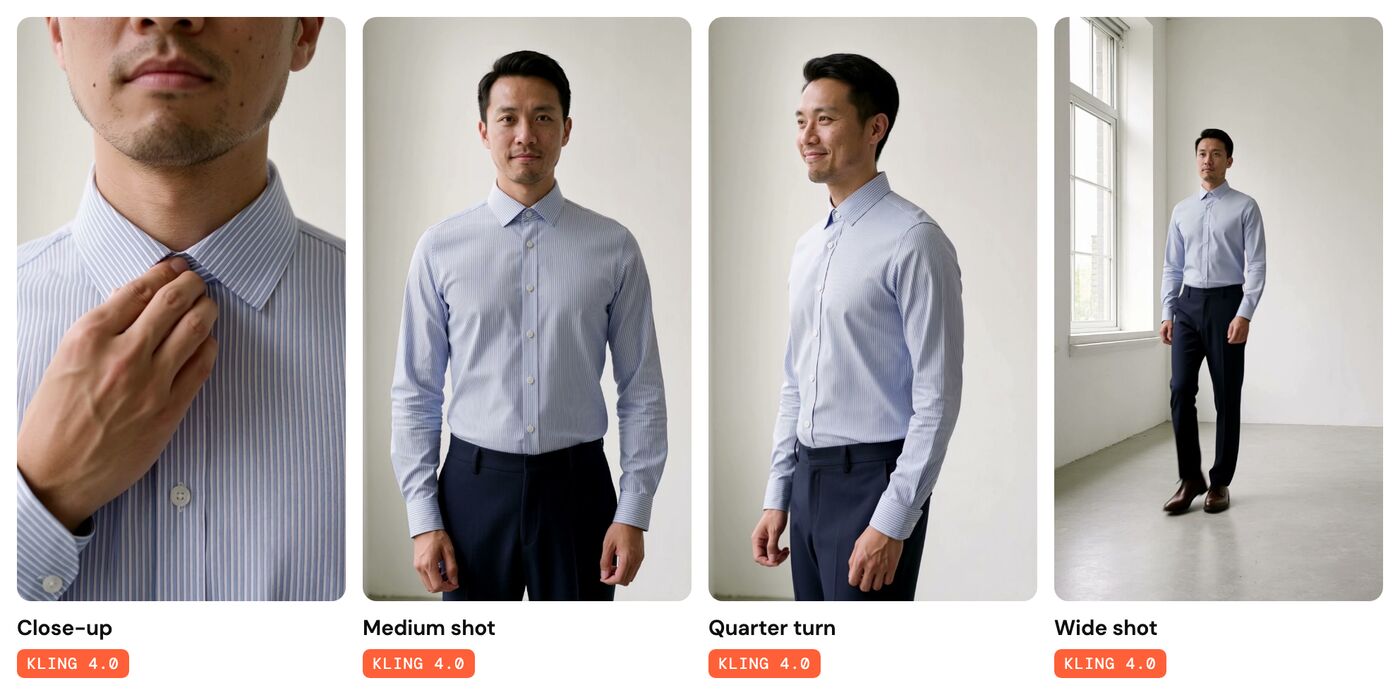
A campaign's lead has to look like the same person in every shot of every film. Toolkit builds that consistency into each stage of a production, from casting to the final render.
The cast is approved first. The client approves each cast member as a portrait before any video is made. That portrait is the reference for every shot that follows, whichever model renders the shot.
The casting is written once. The director sets the casting in the film's treatment, and Toolkit carries that casting into every shot.
The face is stored. Toolkit supports Kling 4.0's new elements feature. A team stores each cast member once, and every shot that names the element shows the same person.
Kling 4.0 gave our fragrance film real wind
The fragrance film needed a sage bush in strong wind, animated from an approved still. SeeDance 2.5 drifted the camera closer, barely moved the leaves and turned the bush pale silver.
Kling 4.0 got the same still and a prompt we tuned for wind. About a second in, Kling 4.0 bent the whole bush in a gust and kept the framing and the colours of the still. We build that prompt work into each client's Creative Workflow.
Kling 4.0 costs less per second to render
Toolkit charges each render in credits per second of video. For a render from text and images at 720P, the rate is 23 credits on Kling 4.0 and 35 on SeeDance 2.5. At 1080P, the usual finish for a brand film, the rates are 34 and 85. The model that gives a brand film more control also has the lower render rate.
Only SeeDance 2.5 renders at 480P, for 15 credits a second. That rate suits ads that a brand tests in volume.
SeeDance 2.5 makes a TikTok-style ad in one render
A TikTok-style ad is a different job. A person handles the product and talks to the camera, the shot changes every few seconds, and a brand needs dozens of versions to test.
SeeDance 2.5 makes the picture, the speech and the sound of that ad in one render. Given product photos and a written direction, SeeDance 2.5 returns one vertical clip of up to 30 seconds. InstantClips, our app that turns a product link into vertical video ads, has rendered on SeeDance 2.5 since August. InstantClips adds each ad's on-screen text after the render.
Toolkit puts several models to work on one film
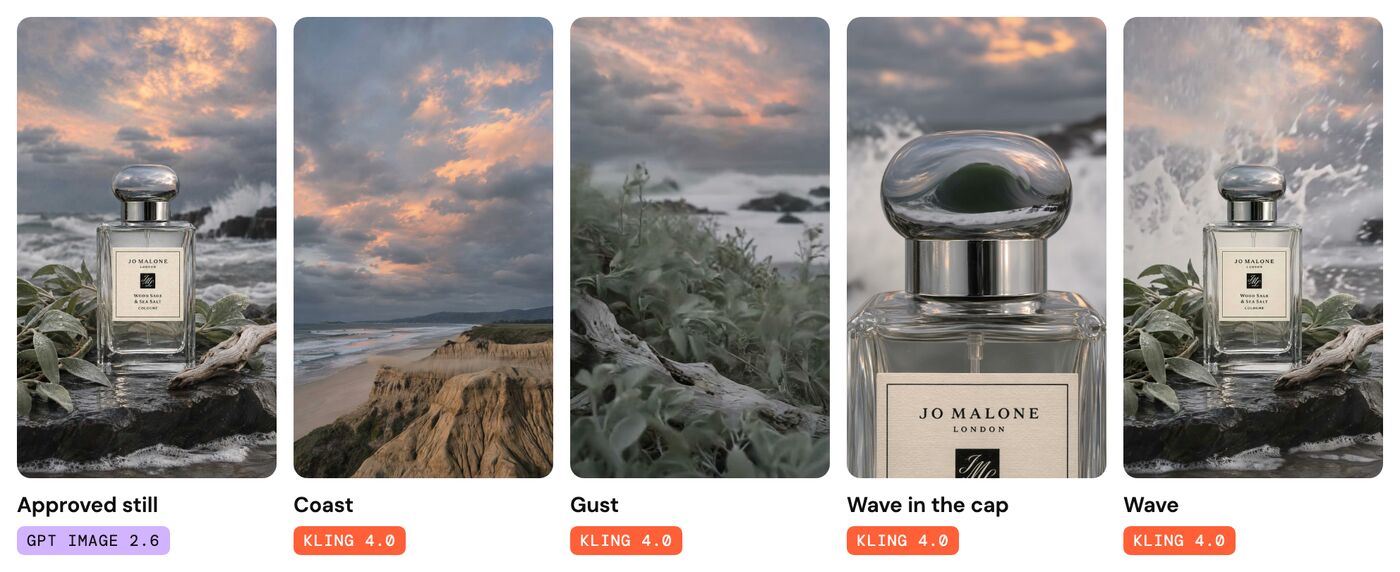
A film made in Toolkit is rarely the work of one model. Our fragrance spec film began as stills from GPT Image 2.6 (Judge an image model by its fifth round of changes). That model set the bottle's label correctly to the letter, and Kling 4.0 kept the label intact while it animated each still. Watch the 22-second film on YouTube.
Other workflows combine models for other jobs. One language-model step writes each shot's prompt, and another checks that prompt against the approved plan before anything renders. An image model casts a presenter, and a video model gives her the performance. Toolkit has a step for each of these jobs, and a Creative Workflow connects the steps (One brief, five image models).
When a lab releases a new model, we add the model to Toolkit and work out its settings on our own productions. A team can then switch one step of a Creative Workflow to the new model. The brief, the brand rules and the approvals stay as they were (Approve the workflow once).